 bug-display-emacs-23-bmm-face.png
Description: PNG image
|
| From: | Drew Adams |
| Subject: | RE: display problem |
| Date: | Mon, 28 May 2007 10:00:07 -0700 |
> By the way, in emacs-unicode-2, make-glyph-code doesn't work
> for a face of ID greater than 511 (in Emacs 22, maximum face
> ID is 4095.  I think there are fairly easy two ways to
> increase this limit.
>
> (1) By contriving the usage of bits.
> For instance, by using 1-bit as a flag, we can use 13-bit
> faces for all Unicode BMP characters, and 8-bit faces for
> the other less-frequenty-used characters.
>
> (2) By using a table that maps 511 face codes to the actual
> face IDs.
> The table registers all faces given to make-glyph-code.  So,
> at most 511 different faces can be used in make-glyph-code.
>
> And the both methods can be combined.
> Is it worth doing such a work?   Currently:
>   (length (face-list)) => 140
> So we won't reach the limit 511 for a while.

I'm not sure whether this is related to what you say above about faces,
Kenichi, but I tried again, using this;

(defun make-glyph-code (char &optional face)
  "Return a glyph code representing char CHAR with face FACE."
  (if face
      (logior char (lsh (face-id face)
                        (if (<= emacs-major-version 22) 19 22)))
    char))

And, again, I use this code, which should cause face `pp^L-highlight' to be
used for the ^L display:

(aset standard-display-table
      ?\014
      (vconcat "\n"
               (mapcar (lambda (c) (make-glyph-code c 'pp^L-highlight))
               "          Section (Printable Page)          ")))

In emacs -Q, the Emacs 23 problem appears to be fixed completely. Thanks.


However, when I use my own setup (which includes lots of other stuff), I do
see the proper display text ("Section (Printable Page)"), but it is
highlighted with face `highlight', not with the face I defined for this
(`pp^L-highlight'). That is, it not only looks like face `highlight', but if
I customize face `highlight', then the appearance of ^L changes accordingly.

In `list-faces-display', face `pp^L-highlight' is displayed correctly; it is
only in the display of ^L that face `highlight' appears in its place. I
don't know why or what this means.

If I position point just before or just after the ^L character (displayed
showing text "Section (Printable Page)"), and I do `C-u C-x =', I see this:

--------8<-----------------
        character: C-j (10, #o12, #xa)
preferred charset: ascii (ASCII (ISO646 IRV))
       code point: 0x0A
           syntax: >    which means: endcomment
      buffer code: #x0A
        file code: #x0A (encoded by coding system undecided-unix)
          display: by this font (glyph code)
     -outline-Lucida
Console-normal-r-normal-normal-14-105-96-96-c-*-iso8859-1 (#x0A)

Character code properties are not shown: customize what to show

There are text properties here:
  auto-composed        t
  fontified            t
--------8<-----------------

And if I position point on the ^L character, and I do `C-u C-x =', then I
see this:

--------8<-----------------
        character: C-l (12, #o14, #xc)
preferred charset: ascii (ASCII (ISO646 IRV))
       code point: 0x0C
           syntax:      which means: whitespace
      buffer code: #x0C
        file code: #x0C (encoded by coding system undecided-unix)
          display: by display table entry [?
 ?  ?  ?  ?  ?  ?  ?  ?  ?  ?  ?S ?e ?c ?t ?i ?o ?n ?  ?( ?P ?r ?i ?n ?t ?a
?b ?l ?e ?  ?P ?a ?g ?e ?) ?  ?  ?  ?  ?  ?  ?  ?  ?  ? ] (see below)

The display table entry is displayed by these fonts (glyph codes):

: -outline-Lucida Console-normal-r-normal-normal-14-105-96-96-c-*-iso8859-1
(#x0A)
 : -outline-Lucida Console-normal-r-normal-normal-14-105-96-96-c-*-iso8859-1
(#x20)
 face: `buffer-menu-mode'
 : -outline-Lucida Console-normal-r-normal-normal-14-105-96-96-c-*-iso8859-1
(#x20)
 face: `buffer-menu-mode'
 : -outline-Lucida Console-normal-r-normal-normal-14-105-96-96-c-*-iso8859-1
(#x20)
 face: `buffer-menu-mode'
 : -outline-Lucida Console-normal-r-normal-normal-14-105-96-96-c-*-iso8859-1
(#x20)
 face: `buffer-menu-mode'
<snip>...
S: -outline-Lucida Console-normal-r-normal-normal-14-105-96-96-c-*-iso8859-1
(#x53)
 face: `buffer-menu-mode'
e: -outline-Lucida Console-normal-r-normal-normal-14-105-96-96-c-*-iso8859-1
(#x65)
 face: `buffer-menu-mode'
c: -outline-Lucida Console-normal-r-normal-normal-14-105-96-96-c-*-iso8859-1
(#x63)
 face: `buffer-menu-mode'
t: -outline-Lucida Console-normal-r-normal-normal-14-105-96-96-c-*-iso8859-1
(#x74)
 face: `buffer-menu-mode'
i: -outline-Lucida Console-normal-r-normal-normal-14-105-96-96-c-*-iso8859-1
(#x69)
 face: `buffer-menu-mode'
o: -outline-Lucida Console-normal-r-normal-normal-14-105-96-96-c-*-iso8859-1
(#x6F)
 face: `buffer-menu-mode'
n: -outline-Lucida Console-normal-r-normal-normal-14-105-96-96-c-*-iso8859-1
(#x6E)
 face: `buffer-menu-mode'
<snip>...
 : -outline-Lucida Console-normal-r-normal-normal-14-105-96-96-c-*-iso8859-1
(#x20)
 face: `buffer-menu-mode'
 : -outline-Lucida Console-normal-r-normal-normal-14-105-96-96-c-*-iso8859-1
(#x20)
 face: `buffer-menu-mode'

Character code properties are not shown: customize what to show

There are text properties here:
  auto-composed        t
  fontified            t
--------8<-----------------

That too I don't understand. It refers to face `buffer-menu-mode', which
looks nothing like either face `highlight' (which is what I see) or face
`pp^L-highlight' (which it should be). Face `buffer-menu-mode' has just a
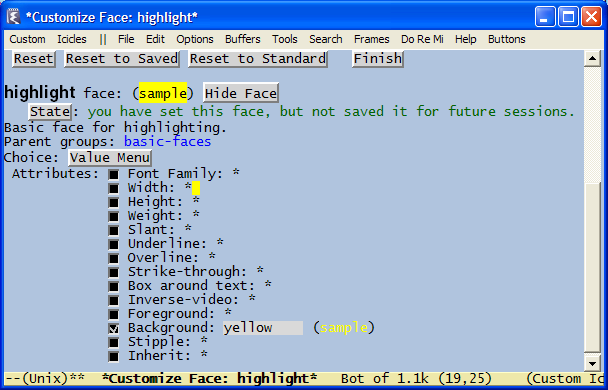
DarkGreen foreground; face `highlight' has just a `yellow' foreground (for
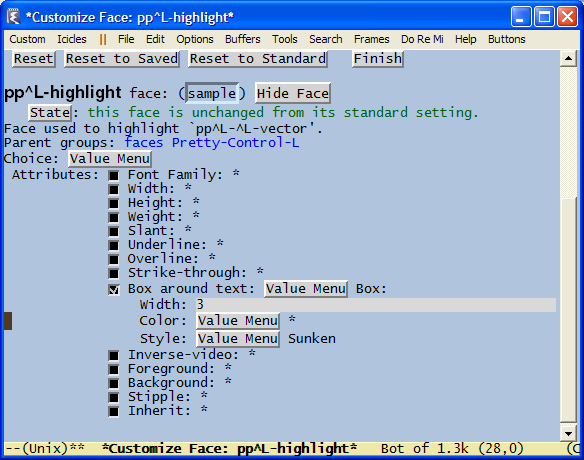
example), and face `pp^L-highlight' has this definition:

--------8<-----------------
Face used to highlight `pp^L-^L-vector'.
Parent groups: faces Pretty-Control-L
Choice: Value Menu
 Attributes: [ ] Font Family: *
             [ ] Width: *
             [ ] Height: *
             [ ] Weight: *
             [ ] Slant: *
             [ ] Underline: *
             [ ] Overline: *
             [ ] Strike-through: *
             [X] Box around text: Value Menu Box:
                 Width: 3
                 Color: Value Menu *
                 Style: Value Menu Sunken
             [ ] Inverse-video: *
             [ ] Foreground: *
             [ ] Background: *
             [ ] Stipple: *
             [ ] Inherit: *
--------8<-----------------

Also, turning `font-lock-mode' off or on has no effect, as I would expect.

Please see the attached screenshots. One shows face `pp^L-highlight' as it
appears in `list-faces-display' and Customize and as it should appear for
^L; another shows how it in fact appears for ^L, using `make-glyph-code' and
modifying the display table. The other two show Customize for faces
`highlight' and `buffer-menu-mode', for comparison.

I realize that I haven't narrowed down the problem very much, but perhaps
the above information will enable you to understand the problem. If not,
I'll try to narrow things down some more, when I have the time.

Any suggestions or explanations are appreciated. For reference, the complete
code I use for the ^L display is here:
http://www.emacswiki.org/cgi-bin/wiki/pp-c-l.el. It's a small file.

Thx - Drew
bug-display-emacs-23-bmm-face.png
Description: PNG image
 bug-display-emacs-23-C-L-face.png
Description: PNG image
 bug-display-emacs-23-C-L-face-as-defined.png
Description: PNG image
 bug-display-emacs-23-highlight-face.png
Description: PNG image
| [Prev in Thread] | Current Thread | [Next in Thread] |